

Guide to Managing Returns, Refunds and Replacements
This guide aims to help sellers manage their return requests and avoid buyers' poor reviews. Please note that the policies and examples provided here are not exhaustive. TikTok Shop's policies may change periodically. For the latest updates, please visit TikTok Shop Policy Center
Key timelines in managing Returns & Refunds
When managing after-sales scenarios, sellers should take note of the following key actions and timelines to avoid unwanted auto refunds:Actions | Guidelines |
| 🎯 Initiating a return/refund request |
|
| 🎯 Approving or rejecting request |
|
| 🎯 Returning a product |
|
| 🎯 Approving or rejecting refunds |
|
If the seller is not satisfied with arbitration results, would like to raise an appeal, check for reimbursement, or report malicious buyers, learn more in the sections below
How to approve or reject the return/refund request?
To manage buyer's return/refund request, sellers should go to Seller Center Manage Returns✅ Options to reject or approve the return/refund request✅ Option to issue a refund
⚠️ Essential to note: To ensure fair and transparent rejection of return/refund request and to support your appeal, sellers will be asked to assess the condition of returned products based on the inspection. This process helps sellers evaluate the condition of returned products more efficiently and support their case with clear documentation.
First, confirm if the return package was received and whether the quantity is correct. If yes, grade the product condition as one of the following:
- Original Condition: Product is unused, and in original packaging with all accessories
- Minor Damage: Minor signs of use, missing labels/tags, but the item is functional
- Severe Damage: Heavily used or missing essential components, unsuitable for resale,
or buyer returned the wrong item
If items are missing, sellers must specify what is missing: a part/accessory, a gift, fewer items than ordered, or an empty package. Providing clear evidence (photos and comments) is mandatory to support the refund rejection and will help the platform to detect potential buyer abuse.
How to manage Return/Refund Requests due to Logistics Issues?
Buyers may also raise a return/refund request caused by the Logistics Provider (lost, damaged, delayed deliveries, misrouted, or empty packages, etc).The seller must take note of the following key actions based on the Shipping Types:
✅ Shipped via Platform: If the reimbursement was not processed automatically, sellers need to raise an appeal to TikTok Shop
✅ Shipped by Sellers: Sellers should contact their selected Logistics Providers
What to do if not satisfied with arbitration results?
When sellers reject a return/refund request, buyers can raise a dispute to reconsider the sellers' initial decision: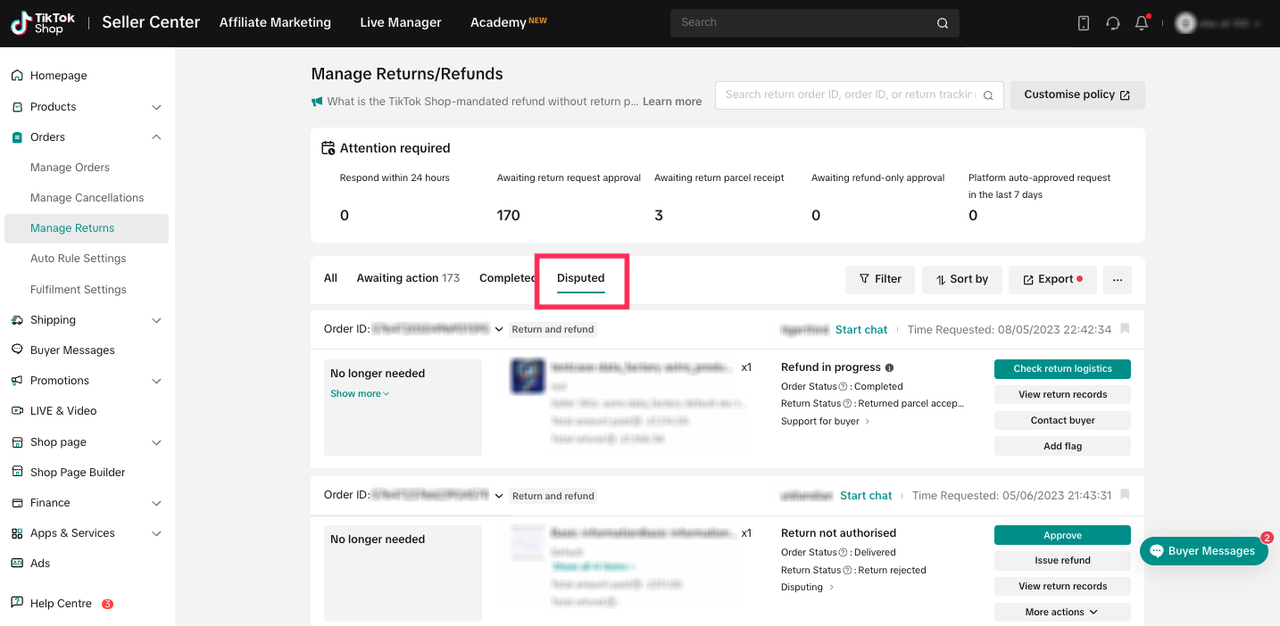
- To monitor and respond to buyer-disputed orders, click on the "Disputed" tab
- Sellers must submit all documentation supporting their case within 48 hours of TikTok Shop's request for the same. Sellers must ensure all submitted documentation is authentic, relevant, complete and accurate.
How to raise an appeal?
Sellers can raise an appeal in Seller Center Manage Returns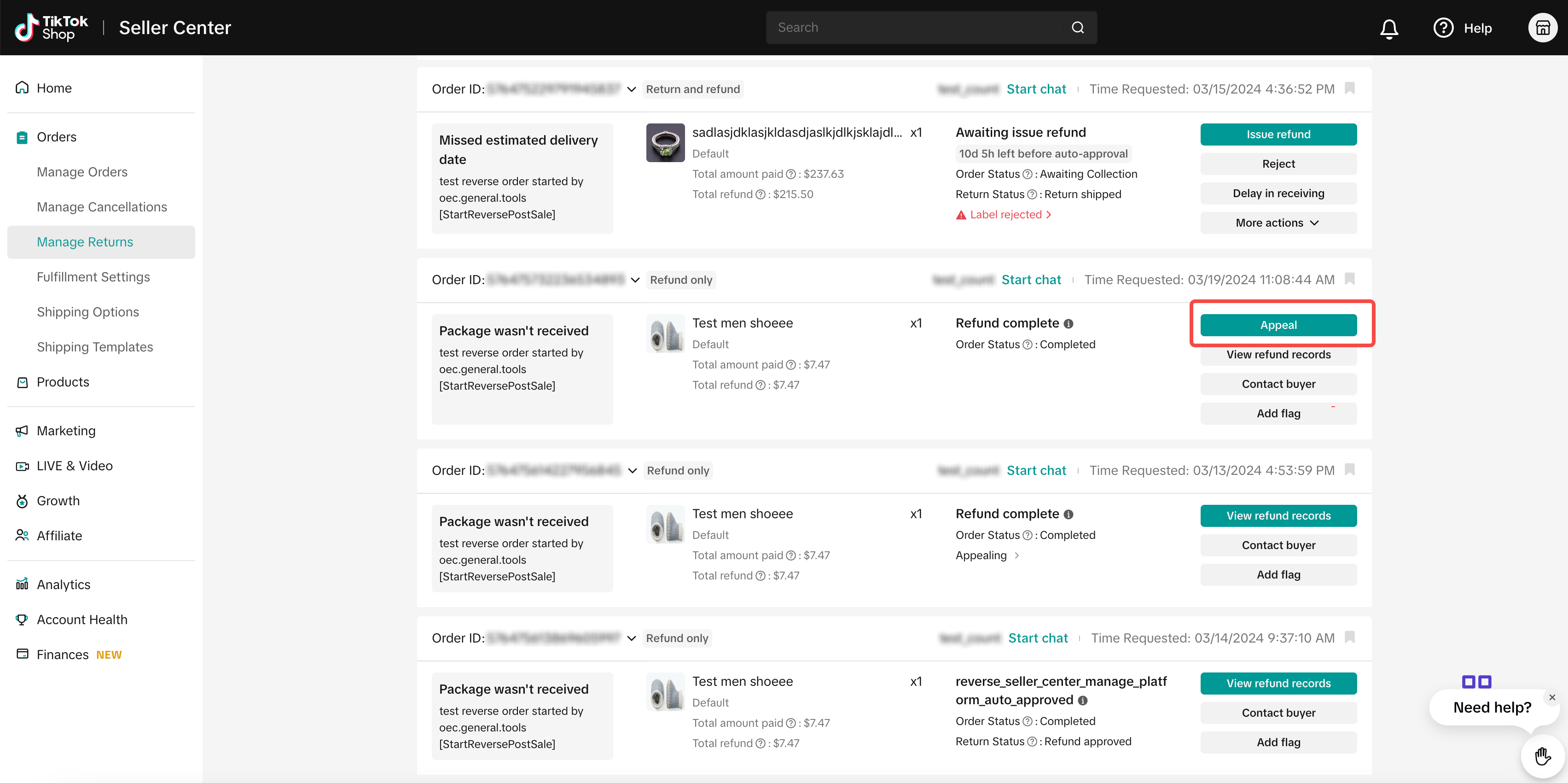 | 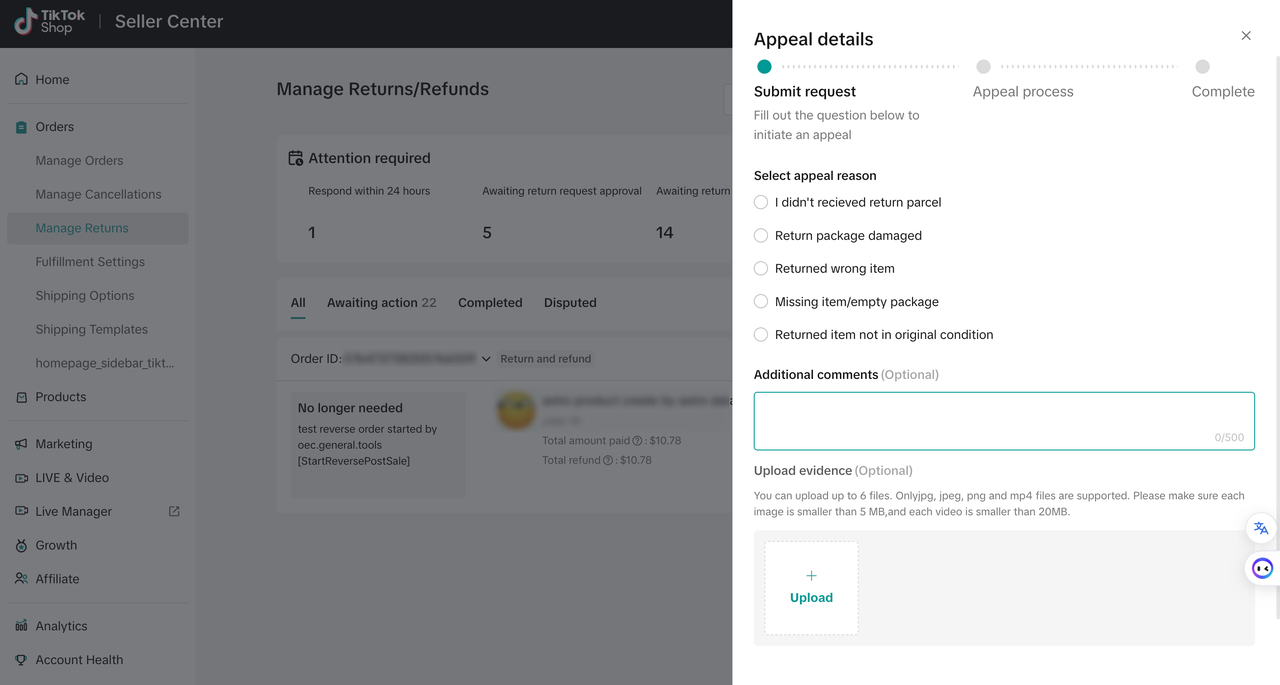 |
✅ Sellers should select an accurate appeal reason
What are the scenarios that can be appealed?
Appeal applies to certain scenarios. If sellers don't see an appeal button, it could mean that a refund was not issued to the buyer or the case is not eligible for appeal.Here are the applicable scenarios for appeal:
✅ Invalid arbitration of returns and refunds in favour of buyers✅ Auto-approved refunds due to delayed deliveries✅ Some auto-approved refunds when sellers fail to confirm the return parcel in time✅ TikTok Shop approves a refund for the packages that were not received by the buyer but the order status is "delivered"
Speedy Refunds
Speedy Refunds is a refund option available once buyers ship their return using TikTok Shop’s contracted drop‑off partner. The refund is processed automatically by TikTok Shop when the return is handed over, allowing buyers to receive their refund quickly.- Eligibility: Speedy Refunds are not available for products priced at 30€ and above.
- Once the returned parcel arrives, the seller needs to inspect and grade the item and evaluate its condition. If the seller determines that the returned product does not meet the return criteria or is not in its original condition, they should grade the item (Original, Minor Damage, Severe Damage, Wrong Item), specify any missing parts, provide clear evidence, and reject the refund within four business days of receiving the returned item.
- Automatic escalation: Once rejected, the system automatically raises an appeal/arbitration ticket for platform review.
How to check seller reimbursement?
If a seller's appeal request has been approved, TikTok Shop will provide the necessary compensation/reimbursement to the seller based on the appealed product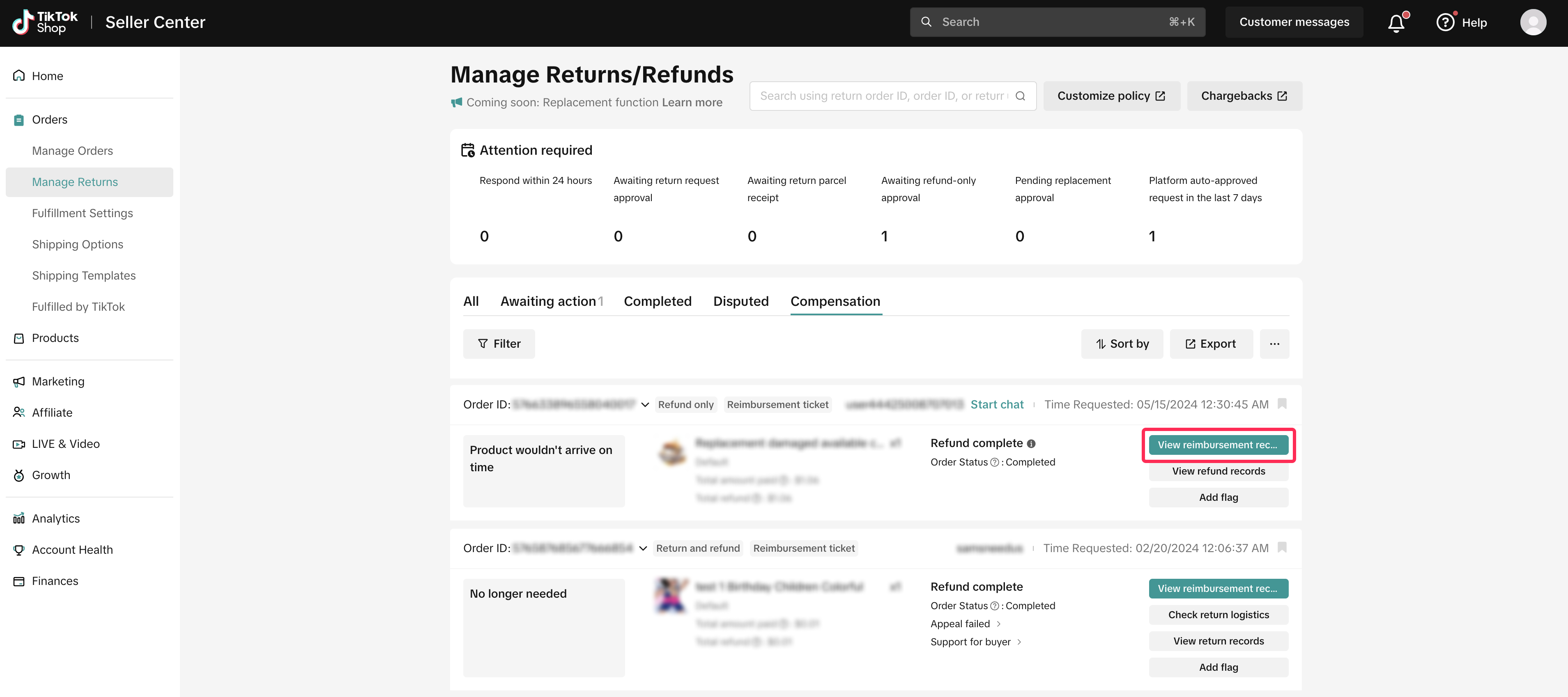
- To monitor the status of the reimbursement, sellers should access Seller Center Manage Returns
- Click on the Compensation tab. Then, see the details by selecting the View Reimbursement Record
- Reimbursement applies to certain scenarios. If sellers don't see the Reimbursement status, it could mean that no refund was issued to the buyer
How to report malicious buyers?
If sellers observe a pattern of return/refund abuse, they can report potential malicious buyers by raising a ticket in the Seller Center and selecting the correct ticket topic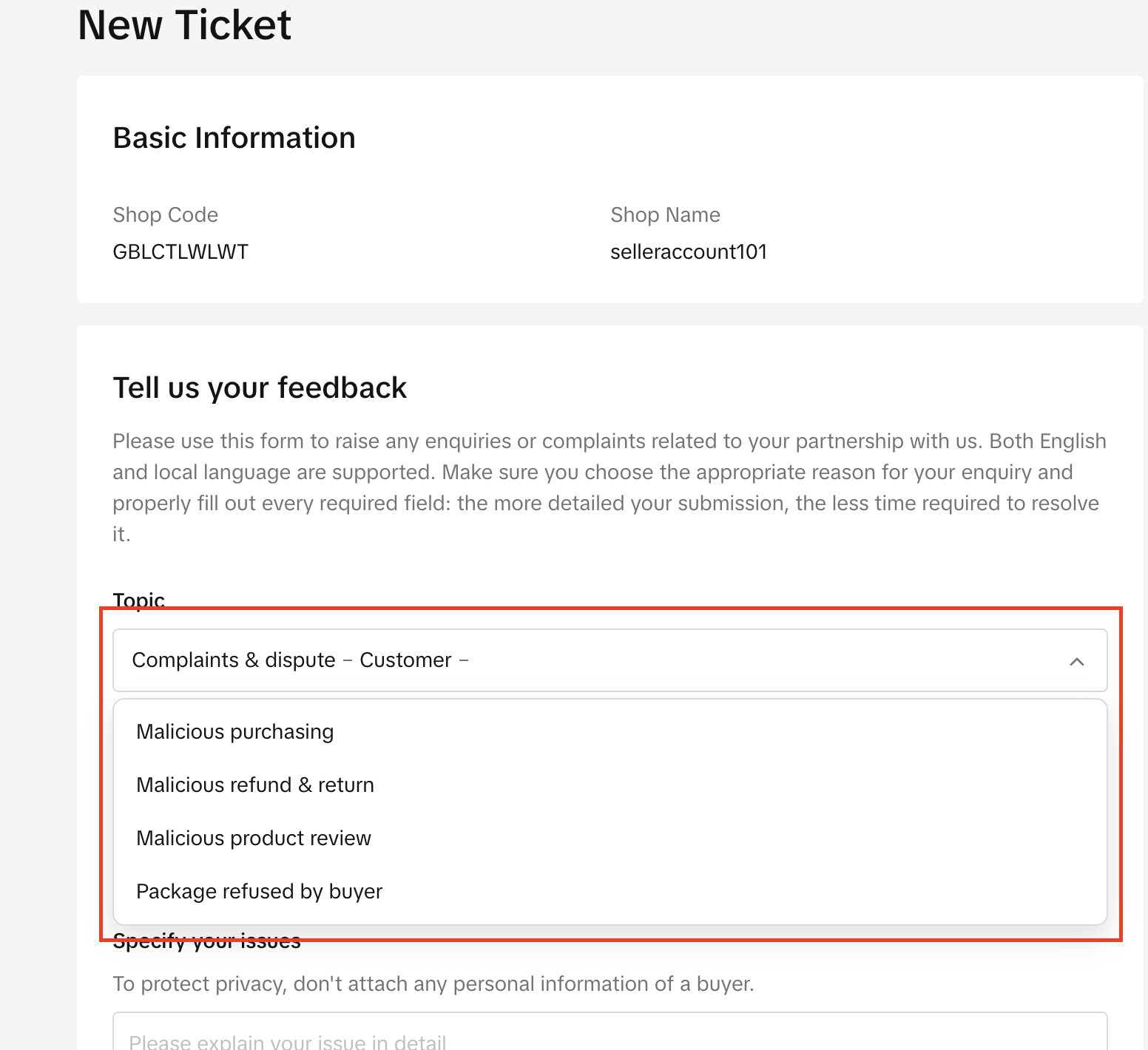
What are the different returns and refund processes?
Sellers are required to decide within 2 business days from the date when the buyer initiated the refund/refund request. Failure to do so may lead to TikTok Shop automatically approving the return request.Depending on the type and product eligibility, buyers can go through these returns & refund processes:Returns that require the seller's quality check
Sellers may initiate a refund once they have received the returning products and determined that the product is a valid return:
- Buyers can initiate a return request for faulty, damaged, or incorrect products within 30 calendar days from the product delivery date.
- TikTok Shop may automatically approve the return request to enable buyers to get their return label, but a refund is not issued at this point.
Returnless Refunds
Refunds may be initiated without requiring eligible products to be returned. There are two (2) types of Returnless Refunds:
✅ Automated Returnless Refunds:
✅ Automated Returnless Refunds:
- Enabled for applicable low value products
- Buyers will get a refund, TikTok Shop will bear the cost, and sellers will get paid.
- If the reason for the return is due to the "Sellers' Fault" (faulty, damaged, or incorrect products, etc.), TikTok Shop will deduct the shipping fee from the amount that will be paid to the seller.
- To activate, sellers should go to Seller Center under Fulfilment Settings and select the "Policies Activated" button in the "Refund without returning item" option
Return due to Change of Mind
🚨Topics that you may be interested in:
❌ Products that are made to the buyer's specifications or clearly personalised
❌ Trading cards which have been opened
- TikTok Shop EU Customer Order Cancellation, Return and Refund Policy
- TikTok Shop Aftersale Dispute Escalation PolicySellers may initiate a refund if the product is eligible for the Change-of-Mind Policy. Sellers must conduct their quality checks to confirm if the returned products are eligible for the exemption.
❌ Products not suitable for return due to health or hygiene reasons: Such as cosmetics, earrings, personal health care products, baby products, feminine hygiene products, intimate apparel such as underwear and swimwear)
❌ Where the packaging has been opened and/or any hygiene seal broken
❌ Audio, video, or computer software products where the security seal has been broken ❌ Products that are made to the buyer's specifications or clearly personalised
❌ Trading cards which have been opened
What sellers need to about refunds on products containing "Pfand" deposit?
Are products that fall within the Pfand System (Deposit Return Scheme, DRS) returnable?
Any product, excluding those highlighted in section 6.2.1 of our returns/refund policy, is considered a returnable category. This includes beverage containers that are part of the Pfandsystem (DRS).Customers will be able to initiate a return request following our standard return process. Based on which one of the following scenarios applies, the seller must follow through with the appropriate steps:
a.) Once the item is returned by the buyer, sellers can approve or reject the refund upon inspection of the item. If the item is returned unopened, the seller should approve the return and the "Pfand" deposit is refunded.
b.) If the buyer is requesting a return for a product not received, the seller must review this return. If approved, the buyer will receive both the product price and the "Pfand" deposit as a refund.
c.) If a buyer disputes a seller's decision to reject a refund, in line with the TikTok Shop EU Aftersale Dispute Escalation Policy, the buyer may request assistance to arbitrate the decision. Our Customer Service team will review the dispute. If the decision is favorable for the buyer, the "Pfand" deposit will be refunded. For more information, please visit our Return policy section 7 on customer disputes.
This is all as per TikTok Shop standard returns/refund process. Please visit our Returns/Refund Policy for additional information.
Is Tiktok Shop a designated Collection point for Empty/used containers?
No, Tiktok shop is not a designated collection point and will not refund customers "Pfand" deposit for used/empty containers. Tiktok Shop will only refund the "Pfand" Deposit if customers initiate a return via Tiktok Shop platform following our Return and Refund policy and are accepted through our standard return process. For customers to get the "PFand" deposit refunded for empty containers, they will have to follow the Pfandsystem guidance and return to a designated collection point.🚨Topics that you may be interested in:TikTok Shop Aftersale Dispute Escalation Policy